Showing posts with label Applications. Show all posts

Sunday, June 3, 2012

Scalado Album v1.1.4 | Album Photo

Scalado Album v1.1.4 | Album Photo

Scalado Album v1.1.4 | Album Photo - Android. Experience your photo memories and enjoy

The Scalado Album is designed for making your everyday photo experience great. We want to bring you the best user experience possible but still keep the design simplistic and responsive. It is built from ground up using the Scalado Imaging Platform to enable maximum performance on Android. The album allows you to quickly find the photos you are looking for and you can smoothly zoom into every single detail in full resolution.

We value your feedback a lot and we are improving the application all the time, but please report bugs and feature requests to our email below and not in the user review. To fix the bugs we may need to contact you.

Reviews:
"Scalado Album For Android Is The Best Image Gallery Alternative With A Slick UI"
Redmondpie – Oliver Haslam

"Viewing photos in Scalado for the first time is a bit like watching high-definition footage for the first time, albeit on a much smaller scale"
PCMAG – Sara Yin

"Scalado Album Android app is a visual treat" 
Phones Review

"A simple to use, high performance, photo/video viewer with a clean and smooth user interface"
Engadget - Myriam Joire

"Pick it up today if you need a replacement for your basic Android gallery"
Slashgear - Chris Burns

New Features in Scalado Album 1.1.4:
- 24 bit color support in full screen
- Zoom beyond 100%
- Long press a folder to hide it 
- Hide/Show folders in settings
- Toggle sort order 
- Now works with Force GPU setting on
- Default filters relevant photo folders
- Enable/Disable Animated Video Thumbnails
- Show/Hide videos
- Possibility to turn off Google Analytics
- Access to Settings menu in more views
- Extended EXIF info

Features:
- Superior gallery performance 
- Clean and smooth user experience
- Intuitive browsing and navigation
- Instant pan and zoom into every detail
- Animated video thumbnails
- Works on Android tablets

Views:
All - Shows all photos on the device
Places - Groups images into named geographical locations
Nearby - Shows all photos taken nearby the current GPS location
Map View - Mapping of photos accessible from all grid views
Months - Groups images after calendar month captured
Folders – Shows images grouped after existing folders
Camera Roll - Shows all photos taken with the device camera

Requirements:
- Minimum Android version is 2.3 Gingerbread!
- We have fixed so that it works with Force GPU in 1.1.4


READ MORE - Scalado Album v1.1.4 | Album Photo

BusyBox Pro v8.0 Apk

BusyBox Pro v8.0 Apk

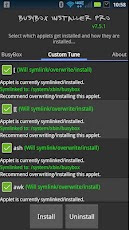
BusyBox Pro v8.0 Apk - Android-9. Root required for this application!

The fastest, most trusted, and most popular BusyBox installer and uninstaller!

Over 2.3 million installs and almost 10,000 5 Star reviews!

Winner of best Utility Software award for Android via Handster.

This is the ONLY Installer on the market that will allow you to remove Busybox (If supported on your phone), the only open sourced installer, and the only installer that is ad free and requires no internet permission!

Featured on the BusyBox website at: http://busybox.net/products.html
The BusyBox source code can be found here: http://git.busybox.net/busybox/

A must have for any rooted phone! Almost EVERY rooted applications needs BusyBox to perform their magic, if you have a rooted phone then you need BusyBox.

Pro version contains no ads or nag screens, uninstall feature, custom tune feature, the ability to hand pick the applets you want, safety check for missing applets on start, and better overall support. The pro version will receive more frequent updates than the free version will.

This installer has the smallest Busybox binaries available, right around 700kb unlike the other installers which are over a meg. Also this installer does not require you to download anything extra like other installers do and thus works much faster.

Please note I did not write BusyBox! I wrote this installer, cross compiled BusyBox for Android. Please see the about menu option for more details or here: www.BusyBox.net

BusyBox is a software application that provides many standard Unix tools, much like the larger (but more capable) GNU Core Utilities. BusyBox is designed to be a small executable for use with the Linux kernel, which makes it ideal for use with embedded devices. It has been self-dubbed "The Swiss Army Knife of Embedded Linux".

This version includes 1.20.1, 1.20.0, 1.19.4, 1.19.3, 1.19.2, and 1.18.5 no need to have more than that because it takes up space on your phone and each newer version will still contain the older features, unless I forgot to compile them in.UPDATED:June 3, 2012

CURRENT VERSION:8.0
REQUIRES ANDROID:1.6 and up
SIZE:5.4M
PRICE:FREE

READ MORE - BusyBox Pro v8.0 Apk

Smart Tools v1.4.5 Apk

Smart Tools v1.4.5 Apk

Smart Tools v1.4.5 Apk - Android-9. Measure length, angle, distance, height, direction and sound with your phone.

Smart Tools is a complete package of 5 app sets. It includes 5 Pro sets for a total of 15 tools. In a word, All-in-One.


Set 1: Length, Angle, Slope, Level - Smart Ruler Pro

Set 2: Distance, Height, Width, Area - Smart Measure Pro

Set 3: Compass, Metal detector, GPS - Smart Compass Pro

Set 4: Sound level meter, Vibrometer - Sound Meter Pro

Set 5: Flashlight - Smart Light Pro


For more information, see the manual for each of the apps, watch the YouTube video and visit the blog: http://androidboy1.blogspot.com/

Even more tools will be added soon. Next will be Speed Gun, Magnifier, and more.

Do you want to get more tools and features? Please send an email. I'll reply to it ASAP.

I hope my apps are useful to your Smart Life. Thanks.

** 1-2% of new users have license problem. If you have it, please send email. We will tell you the normal instructions.

UPDATED:June 3, 2012
CURRENT VERSION:1.4.5
REQUIRES ANDROID:2.1 and up
SIZE:4.3M
PRICE:FREE
READ MORE - Smart Tools v1.4.5 Apk

Saturday, June 2, 2012

Download WhatsApp Messenger v2.7.8509

WhatsApp Messenger v2.7.8509 WhatsApp Messenger v2.7.8509 WhatsApp Messenger v2.7.8509

Download WhatsApp Messenger v2.7.8509 - Android-9. Get WhatsApp Messenger and say goodbye to SMS!

WhatsApp Messenger is a smartphone messenger available for Android, BlackBerry, iPhone, Windows Phone and Nokia phones. WhatsApp uses your 3G or WiFi (when available) to message with friends and family. Switch from SMS to WhatsApp to send and receive messages, pictures, audio notes, and video messages. First year FREE! ($0.99/year after)

WHY USE WHATSAPP:

★ NO HIDDEN COST: Once you and your friends download the application, you can use it to chat as much as you want. Send a million messages a day to your friends for free! WhatsApp uses your Internet connection: 3G/EDGE or Wi-Fi when available.

★ MULTIMEDIA: Send Video, Images, and Voice notes to your friends and contacts.

★ GROUP CHAT: Enjoy group conversations with your contacts.

★ NO INTERNATIONAL CHARGES: Just like there is no added cost to send an international email, there is no cost to send WhatsApp messages internationally. Chat with your friends all over the world as long as they have WhatsApp Messenger installed and avoid those pesky international SMS costs.

★ SAY NO TO PINS AND USERNAMES: Why even bother having to remember yet another PIN or username? WhatsApp works with your phone number, just like SMS would, and integrates flawlessly with your existing phone address book.

★ NO NEED TO LOG IN/OUT: No more confusion about getting logged off from another computer or device. With push notifications WhatsApp is ALWAYS ON and ALWAYS CONNECTED.

★ NO NEED TO ADD BUDDIES: Your Address Book is used to automatically connect you with your contacts. Your contacts who already have WhatsApp Messenger will be automatically displayed.

★ OFFLINE MESSAGES: Even if you miss your push notifications or turn off your phone, WhatsApp will save your messages offline until you retrieve them during the next application use.

★ AND MUCH MORE: Share location, Exchange contacts, Custom wallpaper, Custom notification sounds, Landscape mode, Precise message time stamps, Email chat history, Broadcast messages and MMS to many contacts at once and much much more!

UPDATED:May 30, 2012
CURRENT VERSION:2.7.8509
REQUIRES ANDROID:2.1 and up
SIZE:4.6M
PRICE:Free

READ MORE - Download WhatsApp Messenger v2.7.8509

Friday, June 1, 2012

Superuser Elite v0.7 | Apk ROOT Android

Superuser Elite v0.7 | Apk ROOT Android


* This is a license package for Superuser. It does nothing on its own. *

Superuser grants and manages root permissions on your rooted phone. This package gives you access to additional features not available to basic users.

Current extra features include:
- Advanced log management
- Per app notification/logging settings
- Pin protection for Superuser prompt
- NFC tag allow (where hardware supports it)
- Ghost mode
- App list and preferences backup/restore
- Featured Root apps list

Proposed Elite features:
- Settings backup/restore
- sqlite installer/verifier
- Root console
- A widget of some kind?
- OVER 9000!!! (It's a feature, deal with it)

These features only work on the Superuser 3 beta that you will have to download and install separately. Trick is figuring out how to get it ;-)

Support request emails that simply say "Doesn't work" or something to that effect are automatically deleted by our stupidity filter and will not be answered.

UPDATED:September 14, 2011
CURRENT VERSION:0.7
REQUIRES ANDROID:1.6 and up
SIZE:141k
PRICE:FREE
READ MORE - Superuser Elite v0.7 | Apk ROOT Android

RepliGo Reader v4.0.2 | Apk PDF Android

RepliGo Reader v4.0.2 | Apk PDF Android

RepliGo Reader v4.0.2 | Apk PDF Android - Android-9. The best way to view, annotate and fill out PDF forms while on the go!

RepliGo PDF Reader enables PDF viewing, annotating and form filling. Review documents on the go by adding highlights, cross outs, underlines, sticky notes, arrows, lines, ovals, rectangles, freehand drawings and text boxes. Comments are stored as standard annotations in the original PDF file, just like Adobe® Acrobat®.

RepliGo PDF Reader also makes a great eBook reader with features like reflowed text, night mode, text-to-speech and brightness settings.

Detailed Features:
* PDF viewing, annotating and form filling of files from your email, memory card, cloud services and the Internet
* Add highlights, cross outs, underlines, sticky notes, arrows, lines, ovals, rectangles, freehand drawings and text boxes
* Adjust colors, border thickness, font size and the note for annotations
* Read documents easily with reflowed text, text-to-speech, night mode and brightness settings
* Scroll quickly through pages by swiping, tapping on the edge of the screen, or by using the volume keys
* Navigate long documents using bookmarks, comments, document links, go to page, search and thumbnails
* Click on email, map, phone and web hyperlinks to launch system applications
* Zoom in and out quickly by pinching or double-tapping on columns, images or tables
* Select text and copy it to the clipboard, or look up definitions using ColorDict
* Rotate documents into one of four orientations
* Open password protected files
* Send PDF files via email, Bluetooth and cloud services
* Keyboard and trackball support

UPDATED:June 1, 2012
CURRENT VERSION:4.0.2
REQUIRES ANDROID:2.0 and up
SIZE:1.5M
PRICE:FREE
READ MORE - RepliGo Reader v4.0.2 | Apk PDF Android

SD Maid Pro - System cleaning tool v0.9.8.6

SD Maid Pro - System cleaning tool v0.9.8.6

SD Maid Pro - System cleaning tool v0.9.8.6 - Android-9. A maid for your android, to regain precious memory and keep it clean & tidy.

THIS APP IS INTENTED FOR ROOTED DEVICES!
Without root, functionality is limited as SD Maid won't have access to all necessary directories.
This is a powerful tool! Use at own risk!

Avoid UNOFFICIAL versions, they are unreliable and cause "package signature" errors.

Nobody is perfect and Android neither.
Apps you have already deleted, sometimes leave data behind.
The system constantly creates logs, crash reports and debug files you don't really need.
The market leaves temporary files of downloaded apps behind.
Lets not go on here...

Why not get a maid to clean it all up? SD maid will help you keep your device neat, clean and tidy for you :)!

Choose a tab, press check and then either click a single item to delete or press the clean all button. It's just that easy.

The explorer is a full fledged filemanager, use it to crawl through your Androids files.

You can use the searcher to open/delete or rename files (wildcards are supported as is searching inside files).

The corpse finder searches your device for dormant directories and compares those to the list of installed applications.

App Control lets you freeze,reset and remove applications (even system apps).

The system cleaner scans the devices known directories with unnecessary files.

You can optimize and shrink bloated databases to speed up access and free space.

View your biggest files and find out what is hogging all the space.

10 features are currently available in the free version and an additional 2 can be unlocked by buying and installing the unlocker.

SD Maid is constantly being developed and is designed very carefully.

Due to the vast amount of android devices it might not work perfectly on everyones device, but i'm working hard to get it there. If you have questions or concerns send me a mail (support@thedarken.eu). I usually respond quite quick and will happily help you out.

UPDATED:June 1, 2012
CURRENT VERSION:0.9.8.6
REQUIRES ANDROID:1.6 and up
SIZE:1.5M
PRICE:Free
READ MORE - SD Maid Pro - System cleaning tool v0.9.8.6

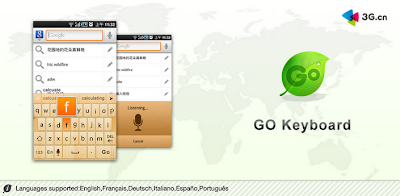
GO Keyboard v1.6.0 | AdFree Apk

GO Keyboard v1.6.0 | AdFree Apk

GO Keyboard is the best and the most popular keyboard on the android market! GO Keyboard can make your typing faster and smarter. It is a essential choice for android mobile.

●Main features::
★Predict in multiple languages and keyboard layouts
★Has accurate dictionaries
★Import contacts
★Support fantasy text output
★Support Emoji
★Support a variety of themes
★Smart to set skin and back ground 
★Auto-memory and correct as you type
★Multi-point touch keyboard
★Support the slide input

●Enable GO Keyboard
First step: after download GO Keyboard, go into the “Menu”, click the [Enable GO Keyboard] to enable.
Second step: long press any input box until popup a menu, choose “Input method”, then choose “GO Keyboard”

●Gesture support:
Swipe left or right to switch layouts
Swipe down to close the keyboard

●Support languages:
☆Pinyin, wubi, stoke, handwriting and voice input
☆cangjie,zhuyin,simple cangjie
☆Ukrainian -UG-українська мова
☆Bulgarian-BG-Български език
☆German-DE- Deutsch 
☆Russian-RU-Русский язык
☆French-FR- française
☆Czech-CS- čeština
☆Croatian-HR- Hrvatski
☆Romanian-RO- română
☆Portuguese-PT-português
☆Turkish-TR- Türkçe
☆Arabic-AR-اللغة العربية‎
☆Slovak-SK- Slovenčina
☆Polish-PL- język polski
☆Norwegian-NO- norsk
☆Hungarian-HU- Magyar
☆Greek-EL- Ἑλληνική
☆Finnish-FT- Suomi
☆Dutch-NL- Nederlands
☆Danish-DA- dansk
☆Swedish-SV- svenska
☆Spanish-ES- Español
☆Hebrew-HE- Ivrit
☆Italian-IT- Italiano
☆Japanese-JA-日本語
☆Farsi-FA-فارسی 
☆Urdu-UR-اردو
☆Lithuanian-LT-Lietuvių
☆Catalan-CA-Català
☆Korean- KO-조선어
☆Indonesian-ID- Bahasa Indonesia
☆Malay- MS- Bahasa Melayu
☆Slovenian- SL-slovenščina
☆Thai- TH -ไทย
More cool ! More free!

UPDATED:May 31, 2012
CURRENT VERSION:1.6.0
REQUIRES ANDROID:1.6 and up
SIZE:5.5M
PRICE:Free

READ MORE - GO Keyboard v1.6.0 | AdFree Apk

Thursday, May 31, 2012

City Time CallerID v1.2

City Time CallerID v1.2


City Time CallerID v1.2 - Android-9. City Time CallerID, your gateway to the world!


City Time CallerID application provides the user with useful information based on the incoming calling number or the outgoing called number. It provides City, State, Type of phone – Landline/Cell Phone, Country name along with the Local Time of that place. This information is presented automatically whenever a user receives a call or makes a call.

For example, if a user gets a call from +1-415-398-****, then the application will show,

San Francisco
California, US
Landline
Mon Apr 30 2012 08:40

Note that City Time CallerID application does not use expensive Data connectivity. All it’s data is stored locally in the phone thus no data usage charges are incurred.

Features:

- There are NO MONTHLY FEES with this application. Only one time charges for download of application.

- For US, City Time CallerID application currently provides City, State, Type of phone - Cell Phone/Landline, Local time of the city information for all over US.

- It has more than 130,000 area listings database for US. It covers both Cell Phone and Landline.

- People making or receiving international calls will automatically get the Country name and Current time of the country in their City Time CallerID display.

- The database of City Time CallerID app is based on Telecom standards like from ITU (International Telecommunication Union).

- For Canada, Mexico, Australia, Russia, Brazil, it provides state/region level information, local time information for each region/state.

- For all other countries across the world, it provides the Country name and the current local time.

- People making or receiving international calls will automatically get the Country name and Current time of the country in their display.

- Usage is very simple. After downloading/installing the application, no other action is required by the user. The application automatically starts showing the relevant information whenever one makes or receives a call.

- No internet/data connectivity is required by the application hence NO Data Usage charges.

- City Time CallerID display is shown for 25 seconds both while receiving or making a call.

- City Time CallerID Application has been designed with utmost care on User Interface. The information display doesn't affect the Incoming/Outgoing call screen in any way. Infact the display is small in size and is semi-transparent. All the buttons like dialling of DTMF digits continue to work in regular way.

- Users can customize the display location - Top, Middle or Bottom of the screen as per convenience.

We ensure quick responses to user queries and concerns. We continuously focus on adding more features to the application.

Even though lot of care has been taken in the City, State, Time, Country information provided in the application. Incase, if you observe any discrepancy, do let us know and we will improve it at the earliest.

You can contact us at support@appzcloud.com. We look forward to having you as our customer.


READ MORE - City Time CallerID v1.2

SetCPU for Root Users v3.0.2

SetCPU for Root Users v3.0.2

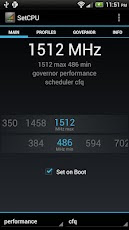
SetCPU for Root Users v3.0.2 - Android-9. SetCPU is a tool for changing the CPU settings (capable of overclock and underclock) on a rooted Android phone, including the Galaxy Nexus, Nexus S, Motorola Droid, Nexus One, G1, G2, Samsung Galaxy S II, myTouch 4G, Motorola Xoom, or one of many other devices to improve performance or save battery.

SetCPU also allows you to set up powerful profiles to change the CPU speed under certain conditions, such as what app is running, when the phone is asleep or charging, when the battery level drops below a certain point, when the phone's temperature is too high, or during certain times of day. See the screenshots for examples of how you might set up profiles.

SetCPU's wide feature set make it useful to beginners and enthusiasts alike. Accelerate your processor to unleash your phone's multitasking potential, or dial your CPU's speed down to save battery.

SetCPU also includes a "voltage control" menu, available to certain devices with custom kernels that support it, to control undervolting to save even more battery. Keep in mind that undervolting is only available for certain kernels.

Recent Changes:
Additional permission: Read logs is used for efficient app condition checking. That is currently all it's used for.

3.0.0:

Profiles tab
- Completely rewrote profiles.
- Older profiles will automatically be converted into new profiles.
- Added app and day of week in addition to the older conditions, and more are coming.
- Profiles now support combining conditions under logical trees, with nestable "and," "or," and "not" operators available. It is now possible to easily build complex profiles that take the place of multiple profiles in the older version.
- Actions can now be selected individually.
- Profiles can now be marked as "non-exclusive," which means they will not block profiles with lower priorities from evaluating. In this case, the profiles with lower priorities will perform only actions which have not been performed by profiles with higher priorities. SetCPU will keep evaluating profiles until it reaches an "exclusive" profile that evaluates as true.
- All number selectors in profiles are now in the style of the frequency selector in the main tab.
- The new file extension for exported profile settings is ".setcpu.json."
- To prevent ambiguous situations, it's no longer possible to select priorities that have been used by other profiles.
- The CPU temperature sensor on OMAP4 and some other devices should now be supported for profiles. The option will appear if available.
- Notifications are now set as an action per profile and can now be non-persistent.
- SetCPU will still use the main screen as a "default profile" to set if no other profiles are active. It is now possible to specify an alternate default profile by creating an exclusive profile with no conditions at priority 0.
- SetCPU now asks for a file name before backing up profiles to storage.
- It is now possible to share profiles without having the internal/external storage mounted.

Main tab
- IO scheduler selection has been added via a drop down menu in the main tab.

Bugfixes
- Fixed a bug where the short benchmark always reported 0 ms.
- Fixed the labels in the pie graph in system info.
- Fixed some common crashes.

Permissions:
Root: SetCPU needs root permissions to modify the CPU speed and other settings.

Start at boot: SetCPU will start a profiles service at boot, if enabled. It also sets default boot settings, if enabled. SetCPU does not run in the background if profiles are not enabled, and becomes inactive after settings, if any, are applied.

Wake lock: This prevents the phone from sleeping while stress testing and benchmarking.

Write external storage: SetCPU needs to read from and write to the SD card or internal storage to back up profiles.

Read phone state: The "in call" condition needs this to determine if the user is making a phone call or not, and trigger the profile if the user wants to.


READ MORE - SetCPU for Root Users v3.0.2

n7player Music Player (Full) v1.2.4 Apk

n7player Music Player (Full) v1.2.4 Apk

n7player Music Player (Full) v1.2.4 Apk - Android-9. n7player - The best way to play music on your Android

This application unlocks the n7player (Trial) and removes the time limitation. Please install the n7player if you want to use it. Any version of n7player should work with this unlocker.

www.lifehacker.com review:
"n7player makes browsing your own library and finding music to listen to fun again."


Key features of the n7player:
- Unique user interface! Fully multi-touchable album covers wall
- Plays: mp3, ogg, m4a, mp4, wav, 3gp, mid, xmf, flac (3.1+), aac (3.1+), mkv (4.0+)
- 5 band EQ with presets, environmental effects, bass boost and SRS (requires 2.3+)
- Album art downloader
- Tag editor
- File browser with filters
- Widgets
- Lockscreen with direct unlock
- Headset support
- Shuffle/repeat features
- Last.fm scrobbling
- m3u playlist support
- Sleep timer
- Lyrics (embedded or via musicXmatch plugin)


READ MORE - n7player Music Player (Full) v1.2.4 Apk

aCurrency Pro (with widget) v4.40 Apk

aCurrency Pro (with widget) v4.40 Apk

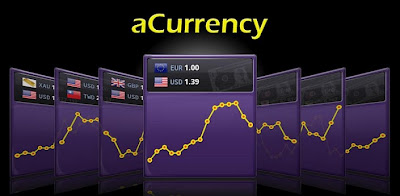
aCurrency Pro (with widget) v4.40 Apk - Android-9. A currency converter for 180+ currencies with hourly exchange rates update

★ Home-screen widgets
★ 1-to-1 exchange rate calculator
★ History charts, 7-day to 2-year
★ Chart shows changes between two dates
★ Track multi-currency
★ Inverse conversion
★ Show percentage change since the previous day
★ Auto update exchange rates
★ Support portrait & landscape mode
★ Offline access
★ Import/export the currency list
★ Auto refresh widgets at you specified interval
★ Take screenshot for sharing

Don't install this app on SD card; otherwise widget functions won't work!

UPDATED:May 31, 2012
CURRENT VERSION:4.40
REQUIRES ANDROID:2.1 and up
SIZE:901k
PRICE:FREE

READ MORE - aCurrency Pro (with widget) v4.40 Apk

Battery Monitor Widget Pro v2.4.1

Battery Monitor Widget Pro v2.4.1

Battery Monitor Widget Pro v2.4.1 - Android-9. Complete battery monitoring with notification icon, history, graphics and alarms

Tested on Galaxy Nexus, Galaxy Note, HTC One X, Iconia A500, Transformer all under ICS: Consumes < 3 seconds of CPU per day using default (recommended) settings.

*** PLEASE EMAIL ANY PROBLEMS/QUESTIONS/SUGGESTIONS, I WILL HELP YOU, I CANNOT PHYSICALLY RESPOND TO ANY COMMENTS ***

The most complete tool to manage your battery: Shows historical data (%, mA, mW, mV and temperature), calculates estimated run-times and battery aging, helps calibrate battery and improve your battery run-time.

NB: 
- NOT all phones report accurate mA - Check app web-site for more information
- The app displays the % remaining, voltage and temperature data reported by Android OS
- HTC One X reports incorrect mA during standby, use mA corrections for better results
- Android battery stats have nothing to do with % calculations

Measures real battery capacity using historical data!

Display all information using great looking graphics, fully scrollable and zoomable.

Use additional packages to show great looking icons in notification bar

Display historical graphics or battery data on your home screen using widgets of various sizes!

Triggers alarm based on battery data (voltage and temperature limits)

Manually resets battery calibration/statistics on rooted phone

Support Motorola Defy/Atrix 1% reporting

Online help accessible from settings

Export data to System Tuner Pro to analyze which process is responsible for battery drain!


Lowest battery consumption on the market! Disable history/graphics for even lower consumption! Check web-site for app consumption and supported phones.


Many thanks for the translation to
Max Peng - Chinese
Zuecho, Stephan Windmüller - German
Gabriele, Roberto & Raffaele - Italian
Rontgen - Japanese
서용석 (Dio Seo) - Korean
Ignacio - Spanish
ToddeSwe - Swedish
Ricardo - Portuguese
Lukas - Czech
Lukasz - Polish
Marko Kranjcic - Croatian
Dmitry Chornenky - Russian

UPDATED:May 31, 2012
CURRENT VERSION:2.4.1
SIZE:1.1M
PRICE:FREE

READ MORE - Battery Monitor Widget Pro v2.4.1

Textgram Pro v1.77 | Apk Text Gram

Textgram Pro v1.77 | Apk Text Gram - Android-9.
** Pro Features **
* Text Rotation
* Frames
* No Ads
Create beautiful graffitis and share them with your friends on Facebook, Instagram, Whatsapp, etc.. or save them in your gallery.

UPDATED:May 30, 2012
CURRENT VERSION:1.77
REQUIRES ANDROID:2.1 and up

SIZE:9.1M
PRICE:FREE

Textgram Pro v1.77 | Apk Text Gram


READ MORE - Textgram Pro v1.77 | Apk Text Gram

AndroVid Pro Video Editor v1.0.3 | Apk Video Android

AndroVid Pro Video Editor v1.0.3 | Apk Video Android

AndroVid Pro Video Editor v1.0.3 | Apk Video Android - Android-9. Trim, split, grab video frames, convert to many audio and video formats, share your videos. AndroVid Pro is the ad-free, commercial version of AndroVid application. Before buying AndroVid Pro, we suggest you to try free version first. AndroVid Pro provides you the following functionalities:

- Trim your videos and produce clips.
- Delete middle parts of a video (AndroVid is the only Video Trimmer providing this feature)
- Split your video files into two separate video clips
- Grab video frames
- Convert your video files to audio formats (MP3, M4A, WAV, WMA, ASF, FLAC)
- Convert your video to other video formats ( AVI, FLV, MP4, MPEG-2, MOV, VOB (Dvd format))
- Video Rotate / Flip feature added (PRO Version)
- Set video frames as wallpaper 
- Share your video clips and grabbed video images. Upload your videos to facebook, youtube etc. 
- Play video clips
- Sort your videos by their name, size, duration and date
- Rename/Delete videos on your phone

If you see any problem please send an email to androvid@androvid.com or report it on our web site http://androvid.blogspot.com

AndroVid Pro uses FFmpeg under permission of LGPL.

CHANGE LOG:
1.0.0:
- First version released

UPDATED:May 27, 2012
CURRENT VERSION:1.0.3
REQUIRES ANDROID:2.1 and up
SIZE:4.4M
PRICE:FREE
READ MORE - AndroVid Pro Video Editor v1.0.3 | Apk Video Android

Wednesday, May 30, 2012

Mobo Video Player Pro v1.1.2 | Apk Video Player


Mobo Video Player Pro v1.1.2 | Apk Video Player

Mobo Video Player Pro v1.1.2 | Apk Video Player

Mobo Video Player Pro v1.1.2 | Apk Video Player
Mobo Video Player Pro v1.1.2 | Apk Video Player - Android-9. Mobo Video Player Pro - the best video player

Mobo Video Player Pro, the best video player
"Video!Video!Video!" will play an important role in your phone's use. Mobo Video Player Pro is the best Video Player in android market to help to play video in your phone and it is totally free!
We ensure you will love this video player after using it.If you are pursuing a video player with the better user experience and user interface,Mobo Video Player Pro will be your ultimate choice. 
Mobo Video Player Pro is the video player supports all the most popular video formats without any conversion. Its smart core technology auto detects video formats and makes it much easier for you to enjoy smoother, better quality videos.
It scans your phone's videos and makes you easier to manage the videos. It keeps your video playing progress and resume video's previous progress. 
It now can hide the videos from the video file list and keep your videos private. Do you have secret videos such as sexy girl or sex videos on your phone that your don't want others to see? The "Hide Video" feature will meet your request.
Mobo Video Player Pro supports such videos as follows:
1.All video formats
2.Supports SRT, SMI plug-in subtitle and MKV embedded subtitle videos.
3.Multi-audio streams and multi-subtitles videos
4.Playlists and continuous play 
5.Advanced media libraries and sort videos by type 6.Thumbnail displays of videos
7.Supports flash formats video - swf, flv videos
8.HD video playing memory optimization
9.Playing gesture
10.Codec Plugin

Mobo Video Player Pro dynamically linked to FFmpeg shared video decoding library, which was compiled to contain LGPL decoders and splitters only. Source codes can be downloaded from this website:

Mobo Video Player Pro is the pro version of Mobo Video Player. It has the new codec-plugin structure, add the playing memory optimization feature to ensure your playing more smoothy, add the playing gesture feature and improve the user experience.

KW:best video player pro audio media movie player ffmpeg mobo best player hide video vplayer MP4 3GP MKV MOV WMV MPEG show moboplayer flash player poweramp rockplayer mVideoPlayer MX Video Player qqplayer mobo video player pro

UPDATED:May 26, 2012
CURRENT VERSION:1.1.2
REQUIRES ANDROID:2.0 and up
SIZE:4.4M
PRICE:Free
READ MORE - Mobo Video Player Pro v1.1.2 | Apk Video Player
Related Posts Plugin for WordPress, Blogger...